1. 核心技术栈
- 后端框架 :Django
- 数据库 :MySQL
- 缓存系统 :Redis(用于商品缓存、库存管理、分布式限流)
- 消息队列 :RabbitMQ(通过Celery实现异步任务处理)
- 异步任务 :Celery(处理非实时性任务,如订单创建、超时检查)
- 支付集成 :支付宝开放平台
- 安全与性能组件 :
- 布隆过滤器(快速过滤无效请求)
- Lua脚本(保证Redis操作原子性)
- 滑动窗口限流(保护系统不被恶意请求攻击)
- 雪花算法(生成分布式唯一ID)
2. 核心模块划分
- 商品模块 :管理秒杀商品信息
- 订单模块 :处理订单创建、支付、取消等
- 支付模块 :集成第三方支付接口
- 任务模块 :处理异步定时任务
- 缓存模块 :管理Redis缓存
- 工具模块 :提供各种工具函数
3. 核心功能设计
3.1 数据模型设计
系统主要包含两个核心数据模型:
SeckillProduct:秒杀商品模型SeckillOrder:秒杀订单模型
3.1.1 秒杀商品 (SeckillProduct)
表名: seckill_products
| 字段名 | 数据类型 | 描述 | 索引 |
|---|---|---|---|
| id | BigAutoField | 商品唯一标识 | 主键 |
| name | CharField(64) | 商品名称 | |
| image | CharField(128) | 商品图片路径 | |
| base_price | DecimalField(10,2) | 原价 | |
| seckill_price | DecimalField(10,2) | 秒杀价 | |
| stock | IntegerField | 秒杀库存 | idx_stock |
| seckill_start_time | DateTimeField | 秒杀开始时间 | idx_status_time |
| seckill_end_time | DateTimeField | 秒杀结束时间 | idx_status_time |
| status | SmallIntegerField | 秒杀状态(0:未开始,1:进行中,2:已结束) | idx_status_time |
| create_time | DateTimeField | 创建时间 | |
| update_time | DateTimeField | 更新时间 |
- idx_status_time : 复合索引 (status, seckill_start_time, seckill_end_time)
- idx_stock : 单字段索引 (stock)
3.1.2 秒杀订单 (SeckillOrder)
表名: seckill_orders
| 字段名 | 数据类型 | 描述 | 索引 |
|---|---|---|---|
| id | BigIntegerField | 订单唯一标识(雪花算法生成) | 主键 |
| user_id | CharField(64) | 用户ID(使用IP地址) | idx_user_create_time |
| goods_id | BigIntegerField | 商品ID | idx_goods_status |
| goods_name | CharField(64) | 商品名称 | |
| seckill_price | DecimalField(10,2) | 秒杀单价 | |
| quantity | SmallIntegerField | 购买数量 | |
| total_amount | DecimalField(10,2) | 订单总金额 | |
| status | SmallIntegerField | 订单状态(0:待支付,1:已支付,2:已取消,3:已完成) | idx_goods_status |
| create_time | DateTimeField | 创建时间 | idx_create_time |
| pay_time | DateTimeField | 支付时间 | |
| cancel_time | DateTimeField | 取消时间 |
- idx_user_create_time : 复合索引 (user_id, create_time)
- idx_goods_status : 复合索引 (goods_id, status)
- idx_create_time : 单字段索引 (create_time)
3.1.3 实体关系
- 一对多关系 : 一个秒杀商品可以对应多个秒杀订单
- 通过 SeckillOrder.goods_id 关联 SeckillProduct.id
3.2 项目整体流程
3.2.1 商品展示
-
商品预热机制
-
系统会提前5分钟将即将开始的秒杀商品加载到Redis
- 减少数据库查询压力,提高响应速度
-
场次设计
-
秒杀活动按时间段(场次)进行,每天分为多个场次
- 用户可以查看不同场次的秒杀商品
3.2.2 秒杀流程
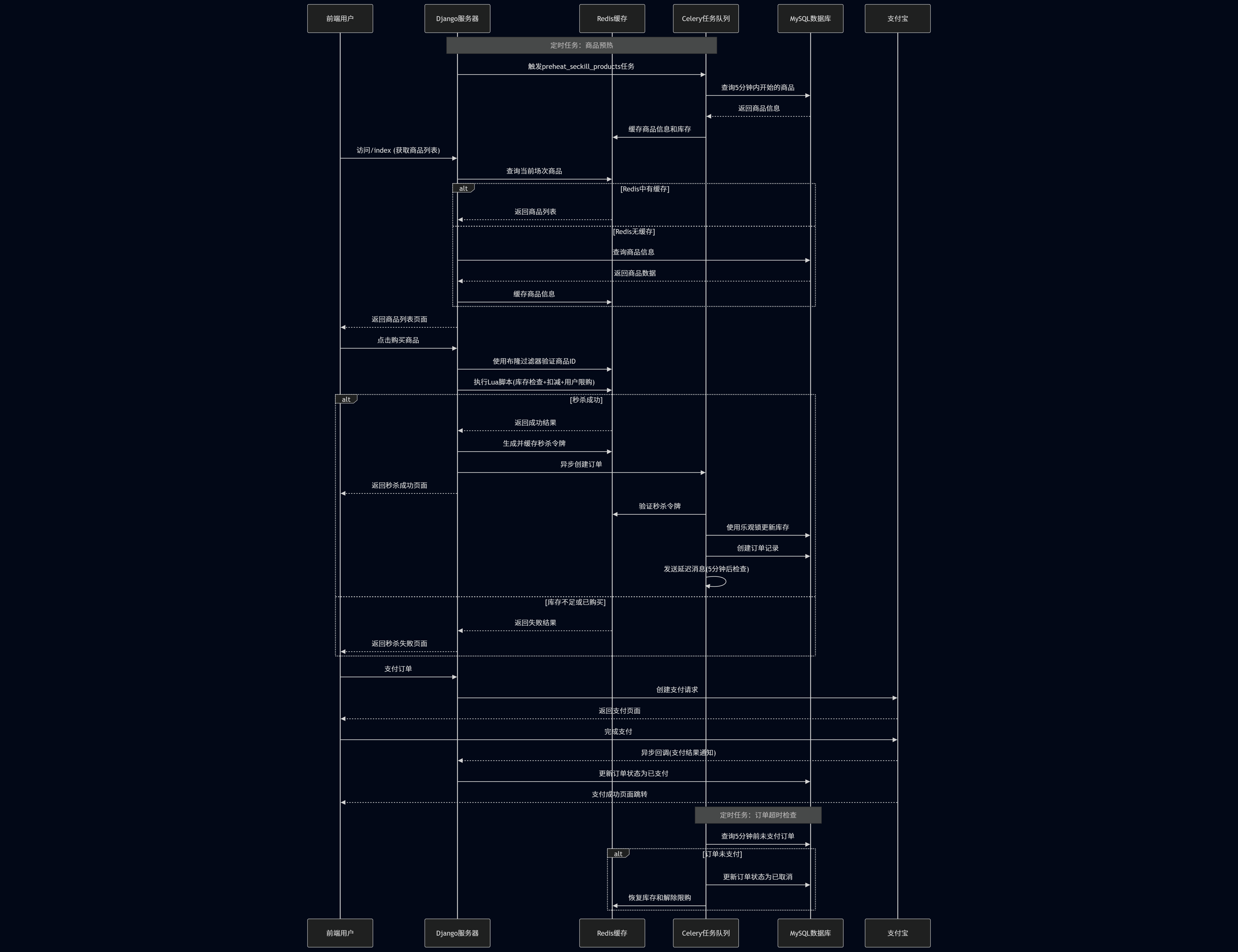
- 限流保护:通过滑动窗口限制用户请求频率
- 商品验证:使用布隆过滤器快速判断商品是否存在
- 库存扣减:使用Lua脚本原子性操作库存
- 订单创建:异步创建订单,不阻塞用户请求
- 支付跳转:引导用户完成支付
3.2.3 异步任务处理
使用Celery处理以下任务:
- 商品预热任务 :提前将商品信息加载到Redis
- 状态更新任务 :定时更新商品秒杀状态
- 订单创建任务 :异步创建订单记录
- 订单超时检查任务 :处理超时未支付的订单
- 库存恢复任务 :订单取消后恢复库存
3.2.4 时序图
4. 高并发优化策略
4.1 多级缓存
- Redis缓存 :商品信息、库存信息预热到Redis
- 本地缓存 :可扩展实现本地缓存减少Redis访问
4.2 防止超卖机制
- Redis Lua脚本 :原子性执行库存检查和扣减
- 数据库乐观锁 :防止多个请求同时修改库存
- 用户限购 :限制每个用户对单个商品的购买次数
4.3 流量削峰
- 限流 :使用滑动窗口算法限制请求频率
- 异步处理 :将订单创建等操作异步化
- 预热机制 :提前加载热点数据
5.4 安全防护
- 布隆过滤器 :快速过滤无效商品ID请求
- 令牌验证 :秒杀成功后生成令牌,防止重复下单
- 幂等性设计 :确保重复请求不会导致错误
5. 关键代码
5.1 秒杀核心逻辑
@sliding_window_limit(threshold=5)  # 限流装饰器
@csrf_exempt
def buy(request, product_id):
    # 1. 布隆过滤器验证商品ID
    # 2. 获取用户标识
    # 3. 检查商品状态
    # 4. 执行Lua脚本扣减库存
    # 5. 生成秒杀令牌
    # 6. 异步创建订单
    # 7. 返回秒杀结果
5.2 异步订单创建
@shared_task(bind=True, max_retries=3)
def create_seckill_order(self, message):
    # 1. 验证秒杀令牌
    # 2. 使用乐观锁更新数据库库存
    # 3. 创建订单记录
    # 4. 发送延迟消息检查订单超时
6. 设计详细
6.1 项目结构
seckill_shop\
├── keys\                   # 密钥文件目录
│   ├── alipay_public_key.pem  # 支付宝公钥
│   └── app_private_key.pem    # 应用私钥
├── manage.py               # Django项目管理脚本
├── requirements.txt        # 项目依赖列表
├── seckill_shop\          # 主项目配置目录
│   ├── __init__.py
│   ├── __pycache__\
│   ├── asgi.py             # ASGI配置
│   ├── celery.py           # Celery配置
│   ├── settings.py         # Django设置
│   ├── urls.py             # 主URL配置
│   └── wsgi.py             # WSGI配置
├── shop\                   # 主要应用目录
│   ├── __init__.py
│   ├── __pycache__\
│   ├── admin.py            # 后台管理配置
│   ├── apps.py             # 应用配置
│   ├── models.py           # 数据模型定义
│   ├── tasks.py            # 异步任务定义
│   ├── tests.py            # 测试文件
│   └── views.py            # 视图函数
├── static\                 # 静态文件目录
│   └── product_img\        # 产品图片
│       └── 扫地机器人.webp
├── templates\              # HTML模板目录
│   ├── index.html          # 首页模板
│   ├── orders.html         # 订单页面模板
│   └── result.html         # 结果页面模板
└── utils\                  # 工具类目录
    ├── __init__.py
    ├── __pycache__\
    ├── alipay.py           # 支付宝相关工具
    ├── bloom.py            # 布隆过滤器实现
    ├── cerate_db.py        # 数据库创建工具
    ├── current_slot.py     # 当前时间场次工具
    ├── lua.py              # Lua脚本工具
    ├── rate_limit.py       # 速率限制实现
    ├── snow_flake.py       # 雪花算法实现
    └── stress_test.py      # 压力测试工具
6.2 数据库模型
6.2.1 表设计
from django.db import models
from django.db.models import Index
from utils.snow_flake import Snowflake


# 秒杀商品模型
class SeckillProduct(models.Model):
    id = models.BigAutoField(primary_key=True, verbose_name="商品唯一标识")
    name = models.CharField(max_length=64, verbose_name="商品名称")
    image = models.CharField(max_length=128, default='/product_img/扫地机器人.webp', verbose_name="商品图片路径")
    base_price = models.DecimalField(max_digits=10, decimal_places=2, verbose_name="原价")
    seckill_price = models.DecimalField(max_digits=10, decimal_places=2, verbose_name="秒杀价")
    stock = models.IntegerField(verbose_name="秒杀库存")
    seckill_start_time = models.DateTimeField(verbose_name="秒杀开始时间")
    seckill_end_time = models.DateTimeField(verbose_name="秒杀结束时间")
    status = models.SmallIntegerField(choices=(
        (0, '未开始'),
        (1, '进行中'),
        (2, '已结束')
    ), default=0, verbose_name="秒杀状态")
    create_time = models.DateTimeField(auto_now_add=True, verbose_name="创建时间")
    update_time = models.DateTimeField(auto_now=True, verbose_name="更新时间")

    class Meta:
        db_table = "seckill_products"
        indexes = [
            Index(fields=['status', 'seckill_start_time', 'seckill_end_time'], name='idx_status_time'),
            Index(fields=['stock'], name='idx_stock')
        ]

# 秒杀订单模型
class SeckillOrder(models.Model):
    id = models.BigIntegerField(primary_key=True, default=Snowflake.generate_id_static, verbose_name="订单唯一标识")
    user_id = models.CharField(max_length=64, verbose_name="用户ID")
    goods_id = models.BigIntegerField(verbose_name="商品ID")
    goods_name = models.CharField(max_length=64, verbose_name="商品名称")
    seckill_price = models.DecimalField(max_digits=10, decimal_places=2, verbose_name="秒杀单价")
    quantity = models.SmallIntegerField(verbose_name="购买数量")
    total_amount = models.DecimalField(max_digits=10, decimal_places=2, verbose_name="订单总金额")
    status = models.SmallIntegerField(choices=(
        (0, '待支付'),
        (1, '已支付'),
        (2, '已取消'),
        (3, '已完成')
    ), verbose_name="订单状态")
    create_time = models.DateTimeField(auto_now_add=True, verbose_name="创建时间")
    pay_time = models.DateTimeField(null=True, blank=True, verbose_name="支付时间")
    cancel_time = models.DateTimeField(null=True, blank=True, verbose_name="取消时间")

    class Meta:
        db_table = "seckill_orders"
        indexes = [
            Index(fields=['user_id', 'create_time'], name='idx_user_create_time'),
            Index(fields=['goods_id', 'status'], name='idx_goods_status'),
            Index(fields=['create_time'], name='idx_create_time')
        ]
6.2.2 雪花算法实现
在项目的utils包下,创建snow_flake.py文件
import threading
import time

class Snowflake:
    """
    雪花算法实现:生成64位分布式唯一ID
    结构:1位符号位 + 41位时间戳 + 5位数据中心ID + 5位机器ID + 12位序列号
    """
    # 单例实例
    _instance = None
    _lock = threading.Lock()

    def __new__(cls, *args, **kwargs):
        """确保类只有一个实例"""
        with cls._lock:
            if not cls._instance:
                cls._instance = super(Snowflake, cls).__new__(cls)
        return cls._instance

    def __init__(self, data_center_id: int = 1, worker_id: int = 1, epoch: int = 1288834974657):
        """
        初始化雪花算法生成器
        :param data_center_id: 数据中心ID (0-31,5位)
        :param worker_id: 机器ID (0-31,5位)
        :param epoch: 起始时间戳(毫秒),默认Twitter的起始时间(2010-11-04 01:42:54 UTC)
        """
        # 防止重复初始化
        if hasattr(self, 'initialized'):
            return

        # 校验数据中心ID和机器ID范围
        if data_center_id < 0 or data_center_id > 31:
            raise ValueError("数据中心ID必须在0-31之间")
        if worker_id < 0 or worker_id > 31:
            raise ValueError("机器ID必须在0-31之间")

        self.data_center_id = data_center_id
        self.worker_id = worker_id
        self.epoch = epoch  # 起始时间戳

        # 位偏移量定义
        self.timestamp_bits = 41
        self.data_center_bits = 5
        self.worker_bits = 5
        self.sequence_bits = 12

        # 最大取值计算
        self.max_data_center_id = (1 << self.data_center_bits) - 1  # 31
        self.max_worker_id = (1 << self.worker_bits) - 1  # 31
        self.max_sequence = (1 << self.sequence_bits) - 1  # 4095

        # 位偏移量
        self.worker_shift = self.sequence_bits  # 12
        self.data_center_shift = self.sequence_bits + self.worker_bits  # 17
        self.timestamp_shift = self.data_center_shift + self.data_center_bits  # 22

        # 状态变量
        self.last_timestamp = -1  # 上一次生成ID的时间戳
        self.sequence = 0  # 当前毫秒内的序列号
        self.lock = threading.Lock()  # 线程锁保证并发安全
        self.initialized = True

    def _get_current_timestamp(self) -> int:
        """获取当前毫秒级时间戳"""
        return int(time.time() * 1000)

    def generate_id(self) -> int:
        """生成唯一ID"""
        with self.lock:  # 加锁保证线程安全
            current_timestamp = self._get_current_timestamp()

            # 处理时钟回拨(当前时间小于上一次生成ID的时间)
            if current_timestamp < self.last_timestamp:
                raise RuntimeError(
                    f"时钟回拨异常:当前时间戳({current_timestamp}) < 上一次时间戳({self.last_timestamp})"
                )

            # 同一毫秒内,序列号自增
            if current_timestamp == self.last_timestamp:
                self.sequence += 1
                # 序列号超出最大值,等待到下一毫秒
                if self.sequence > self.max_sequence:
                    # 循环等待下一毫秒
                    while current_timestamp <= self.last_timestamp:
                        current_timestamp = self._get_current_timestamp()
                    self.sequence = 0  # 重置序列号
            else:
                # 不同毫秒,重置序列号
                self.sequence = 0

            # 更新上一次时间戳
            self.last_timestamp = current_timestamp

            # 组合ID各部分(位运算)
            timestamp_part = (current_timestamp - self.epoch) << self.timestamp_shift
            data_center_part = self.data_center_id << self.data_center_shift
            worker_part = self.worker_id << self.worker_shift
            sequence_part = self.sequence

            return timestamp_part | data_center_part | worker_part | sequence_part

    @classmethod
    def generate_id_static(cls) -> int:
        """静态方法,用于模型默认值"""
        # 获取或创建单例实例
        if not cls._instance:
            cls._instance = cls()
        return cls._instance.generate_id()
6.3 商品视图
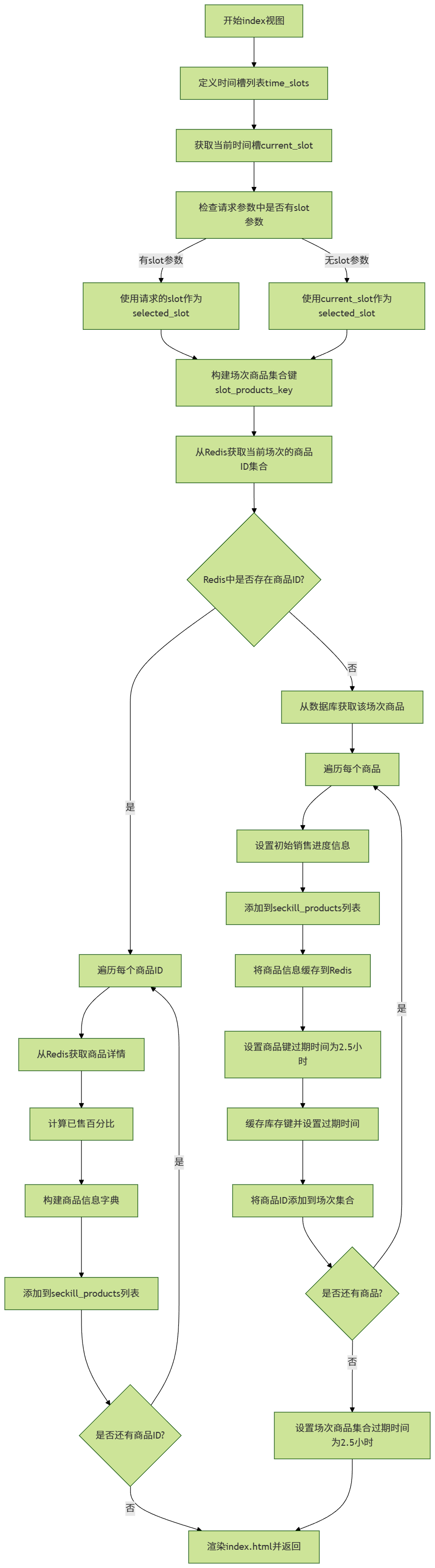
商品页面分为多个场次,每场持续两个小时,根据当前时间,默认加载对应场次商品,对于其他场次的商品实现懒加载。
6.3.1 处理逻辑
-
设计定时任务,每场秒杀商品在开始前五分钟进行预热,加载到Redis中,后续商品数据查询之间访问Redis。
-
根据当前时间判断所处的正在进行中的场次,默认加载当前进行中的场次。
-
根据前端用户点击的场次选项信息,实现对应商品数据的懒加载(优先从缓存中查询商品数据,如果没有则访问数据库然后再缓存到Redis中)。
前端场次按钮点击后应该向商品视图传递场次信息
6.3.2 实现代码
@sliding_window_limit(threshold=5)
def index(request):
    time_slots = [8, 10, 12, 14, 16, 18, 20, 22]

    current_slot = get_current_slot(datetime.now().hour)
    # 判断用户点击场次
    slot_param = request.GET.get('slot')
    if slot_param:
        selected_slot = int(slot_param)
    else:
        selected_slot = current_slot

    # 场次商品集合键
    slot_products_key = f"seckill:slot:{selected_slot}:products"
    # 从Redis中获取当前场次的商品ID集合
    product_ids = redis_client.smembers(slot_products_key)

    seckill_products = []

    # 如果redis中存在商品
    if product_ids:

        # 从redis中获取商品详情
        for product_id in product_ids:
            # 商品键
            product_key = f"seckill:product:{product_id.decode()}"
            product_data = redis_client.hgetall(product_key)
            if product_data:
                # 将字节数据转换为Python对象
                stock = int(product_data[b'stock'].decode())
                # 获取总库存(初始库存)
                total_stock = int(product_data.get(b'total_stock', product_data[b'stock']).decode())
                # 计算已售百分比
                sold_percentage = 0
                if total_stock > 0:
                    sold_percentage = min(100, round((total_stock - stock) / total_stock * 100))

                product_info = {
                    'id': int(product_data[b'id'].decode()),
                    'name': product_data[b'name'].decode(),
                    'seckill_price': float(product_data[b'seckill_price'].decode()),
                    'base_price': float(product_data[b'base_price'].decode()),
                    'stock': stock,
                    'total_stock': total_stock,
                    'sold_percentage': sold_percentage,
                    'status': int(product_data[b'status'].decode()),
                    'image': '/product_img/扫地机器人.webp',  # 默认图片
                    'seckill_start_time': datetime.fromisoformat(product_data[b'seckill_start_time'].decode()),
                    'seckill_end_time': datetime.fromisoformat(product_data[b'seckill_end_time'].decode())
                }
                seckill_products.append(product_info)
    else:
        # Redis中没有缓存,从数据库获取并缓存
        now = datetime.now()
        start_time = timezone.make_aware(datetime(now.year, now.month, now.day, selected_slot, 0, 0))
        db_products = SeckillProduct.objects.filter(seckill_start_time=start_time)

        # 将数据库商品添加到列表并缓存到Redis
        for product in db_products:
            # 为每个商品添加销售进度信息
            product.total_stock = product.stock  # 初始库存等于当前库存
            product.sold_percentage = 0  # 初始已售百分比为0
            seckill_products.append(product)
            # 缓存商品信息到Redis
            product_key = f"seckill:product:{product.id}"
            product_data = {
                "id": product.id,
                "name": product.name,
                "seckill_price": str(product.seckill_price),
                "base_price": str(product.base_price),
                "stock": product.stock,
                "total_stock": product.stock,  # 保存初始库存用于计算销售进度
                "status": product.status,
                "seckill_start_time": product.seckill_start_time.isoformat() if product.seckill_start_time else "",
                "seckill_end_time": product.seckill_end_time.isoformat() if product.seckill_end_time else ""
            }
            redis_client.hset(product_key, mapping=product_data)
            # 为商品键设置2.5小时过期时间
            redis_client.expire(product_key, 9000)

            # 缓存库存键
            stock_key = f"seckill:stock:{product.id}"
            redis_client.set(stock_key, product.stock)
            redis_client.expire(stock_key, 9000)

            # 将商品ID添加到场次集合中
            redis_client.sadd(slot_products_key, product.id)

        # 设置场次商品集合的过期时间为2.5小时
        redis_client.expire(slot_products_key, 9000)

    return render(request, "index.html", {
        "seckill_products": seckill_products,
        "time_slots": time_slots,
        "selected_slot": selected_slot
    })
6.4 抢购视图
6.4.1 处理逻辑
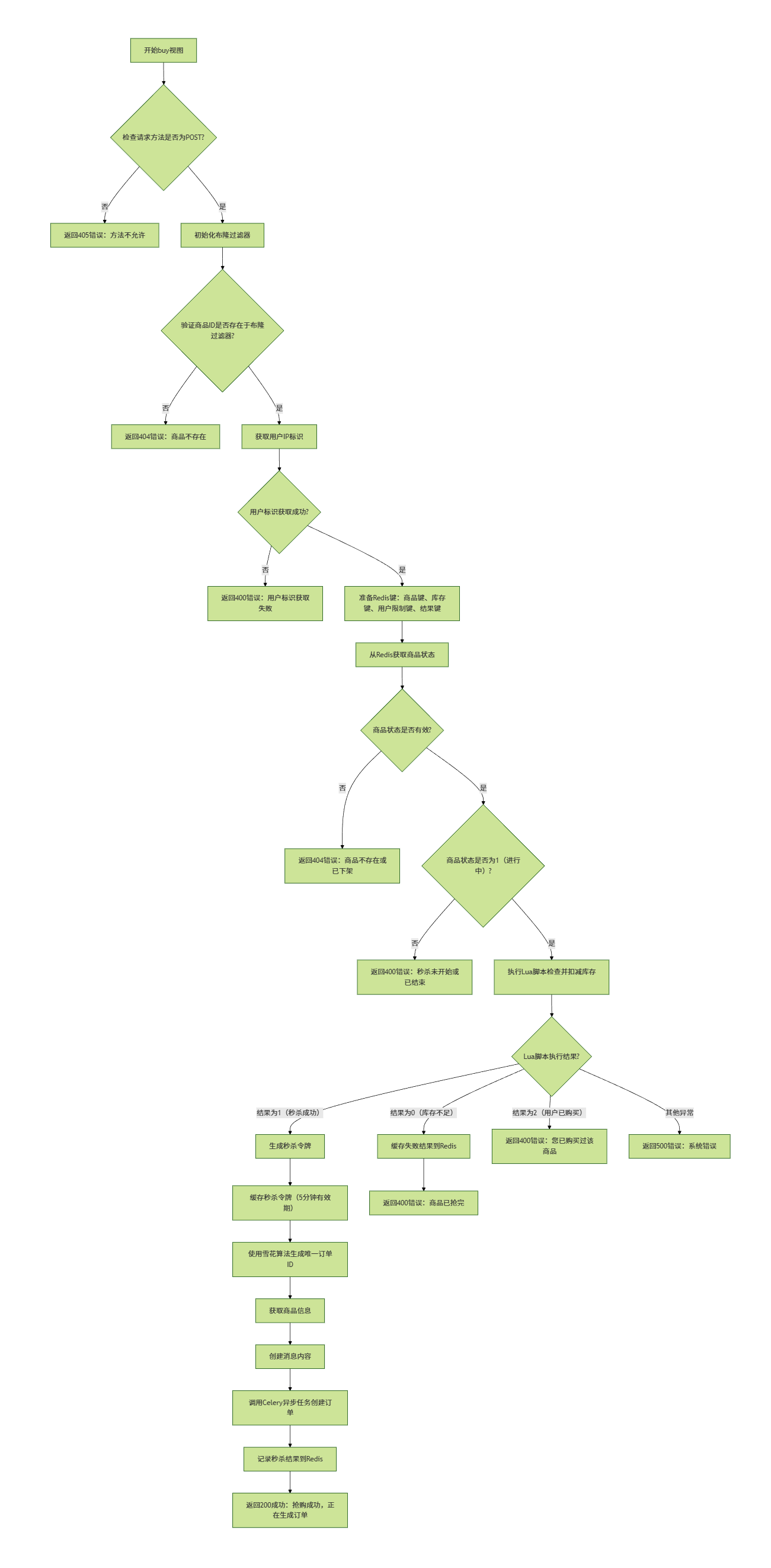
- 用户点击抢购按钮后,首先进行检验:
- 拦截非POST请求
- 使用布隆过滤器过滤不存在的商品,避免缓存穿透
- 获取用户表示进行限购
- 从redis中获取商品状态信息
- 执行Lua脚本,实现库存原子性扣减
- 使用Celery+RabbitMQ异步创建订单
6.4.2 实现代码
@sliding_window_limit(threshold=5)
def buy(request, product_id):
    if request.method != "POST":
        return render(request, "result.html", {"code": 405, "msg": "方法不允许"})

    # 初始化布隆过滤器
    init_bloom_filter()

    # 验证商品ID是否存在
    if not product_bloom.contains(product_id):
        return render(request, "result.html", {"code": 404, "msg": "商品不存在"})

    # 获取用户ip标识用于购物限量
    user_id = request.META.get('HTTP_X_FORWARDED_FOR', '127.0.0.1')
    if not user_id:
        return render(request, "result.html", {"code": 400, "msg": "用户标识获取失败"})

    product_key = f"seckill:product:{product_id}"   # 商品键
    stock_key = f"seckill:stock:{product_id}"    # 库存键
    user_limit_key = f"seckill:user_limit:{product_id}"  # 记录已购买用户
    result_key = f"seckill:result:{user_id}:{product_id}"  # 秒杀结果缓存

    # 检查商品状态
    try:
        # 从Redis获取状态
        status = redis_client.hget(product_key, "status")
        if status is None:
            # 如果Redis中没有找到状态,可能是商品不存在或者缓存过期
            return render(request, "result.html", {"code": 404, "msg": "商品不存在或已下架"})

        if int(status) != 1:
            return render(request, "result.html", {"code": 400, "msg": "秒杀未开始或已结束"})
    except SeckillProduct.DoesNotExist:
        return render(request, "result.html", {"code": 404, "msg": "商品不存在"})

    # 执行Lua脚本,检查并扣减库存
    try:
        # 执行Lua脚本
        result = redis_client.eval(
            STOCK_DECR_SCRIPT,
            3,  # 键的数量
            stock_key, product_key, user_limit_key,  # 三个KEYS参数
            user_id  # ARGV参数
        )

        # 秒杀成功
        if result == 1:
            # 生成秒杀令牌
            timestamp = int(time.time() * 1000)
            token_data = f"{user_id}:{product_id}:{timestamp}:{settings.SECRET_KEY}"
            seckill_token = hashlib.md5(token_data.encode()).hexdigest()

            # 缓存秒杀令牌,用于订单创建时验证
            token_key = f"seckill:token:{seckill_token}"
            token_value = json.dumps({
                "user_id": user_id,
                "product_id": product_id,
                "timestamp": timestamp
            })
            redis_client.setex(token_key, 300, token_value)  # 令牌5分钟内有效

            # 生成唯一订单ID
            order_id = snowflake.generate_id()

            # 获取商品信息
            product_data = redis_client.hgetall(product_key)
            product_info = {
                "id": product_id,
                "name": product_data[b"name"].decode(),
                "seckill_price": float(product_data[b"seckill_price"].decode())
            }

            # 创建消息内容,包含用户ID、商品ID、秒杀令牌
            message = {
                "order_id": order_id,
                "user_id": user_id,
                "product_id": product_id,
                "seckill_token": seckill_token,
                "product_info": product_info
            }

            # 调用Celery异步任务,通过RabbitMQ发送消息
            create_seckill_order.delay(message=message)

            # 记录秒杀结果(供前端轮询)
            redis_client.setex(result_key, 300, json.dumps({
                "success": True,
                "order_id": order_id
            }))

            return render(request, "result.html", {
                "code": 200,
                "msg": "抢购成功,正在生成订单...",
                "order_id": order_id
            })
        # 库存不足
        elif result == 0:
            redis_client.setex(result_key, 60, json.dumps({"success": False, "msg": "商品已抢完"}))
            return render(request, "result.html", {"code": 400, "msg": "商品已抢完"})

        # 用户已购买
        elif result == 2:
            return render(request, "result.html", {"code": 400, "msg": "您已购买过该商品"})

    except Exception as e:
        return render(request, "result.html", {"code": 500, "msg": f"系统错误:{str(e)}"})
异步任务:
@shared_task(bind=True, max_retries=3)
def create_seckill_order(self, message):
    """
    从RabbitMQ拉取消息,异步创建秒杀订单
    包含秒杀令牌验证和乐观锁防超卖
    """
    try:
        # 解包消息内容
        order_id = message['order_id']
        user_id = message['user_id']
        product_id = message['product_id']
        seckill_token = message['seckill_token']
        product_info = message['product_info']

        # 1. 验证秒杀令牌
        redis_client = django_redis.get_redis_connection("default")
        token_key = f"seckill:token:{seckill_token}"
        token_data = redis_client.get(token_key)

        if not token_data:
            raise ValueError(f"无效或过期的秒杀令牌: {seckill_token}")

        token_info = json.loads(token_data)
        # 验证令牌中的用户ID和商品ID是否匹配
        if token_info['user_id'] != user_id or token_info['product_id'] != product_id:
            raise ValueError(f"秒杀令牌验证失败: 用户ID或商品ID不匹配")

        # 验证通过后删除令牌,防止重复使用
        redis_client.delete(token_key)

        # 2. 使用乐观锁更新数据库库存并创建订单
        # 获取商品信息并检查库存
        product = SeckillProduct.objects.get(id=product_id)

        # 乐观锁实现:检查库存是否足够,足够则更新
        if product.stock > 0:
            # 使用F表达式和update_fields实现乐观锁
            # 只有当stock大于0且在update期间未被其他进程修改时才会成功
            updated_count = SeckillProduct.objects.filter(
                id=product_id,
                stock__gt=0  # 确保库存大于0
            ).update(
                stock=F('stock') - 1,
                update_time=timezone.now()
            )

            # 检查更新是否成功
            if updated_count == 0:
                # 乐观锁失败,说明库存已被其他请求消耗
                # 回滚Redis中的库存
                redis_client.incr(f"seckill:stock:{product_id}")
                raise ValueError(f"乐观锁失败,库存已不足: {product_id}")

            # 3. 创建订单
            order = SeckillOrder(
                id=order_id,
                user_id=user_id,
                goods_id=product_id,
                goods_name=product_info["name"],
                seckill_price=product_info["seckill_price"],
                quantity=1,
                total_amount=product_info["seckill_price"],
                status=0  # 待支付
            )
            order.save()

            print(f"订单创建成功: {order_id}, 商品: {product_info['name']}")

            # 发送延迟消息到RabbitMQ,5分钟后检查订单状态
            order_timeout_check.apply_async(
                args=[order_id, product_id, user_id],
                countdown=300  # 5分钟后执行
            )

            return f"订单创建成功: {order_id}"
        else:
            # 库存不足,回滚Redis中的库存
            redis_client.incr(f"seckill:stock:{product_id}")
            raise ValueError(f"库存不足,无法创建订单: {product_id}")

    except SeckillProduct.DoesNotExist:
        raise ValueError(f"商品不存在: {product_id}")
    except Exception as e:
        # 失败重试(最多3次)
        if self.request.retries < self.max_retries:
            print(f"订单创建失败,将重试: {order_id}, 错误: {str(e)}")
            return self.retry(exc=e, countdown=2)
        # 重试失败后回滚库存
        try:
            redis_client = django_redis.get_redis_connection("default")
            redis_client.incr(f"seckill:stock:{product_id}")
            print(f"重试失败,已回滚库存: {product_id}")
        except Exception as rollback_error:
            print(f"回滚库存失败: {rollback_error}")
        raise e
7. 其它
- 本项目支付功能使用了支付宝接口,详细请见:支付宝沙箱保姆级教程!以Django框架为例_python对接之支付宝支付-CSDN博客。
- 使用延迟消息实现订单超时取消功能,具体可见项目源码中的
tasks.order_timeout_check。 - 如果使用Windows环境开发时,Celery遇到
PermissionError: [WinError 5] 拒绝访问问题,可以使用eventlet作为并发池解决。
# 1. 安装eventlet
pip install eventlet

# 2. 使用eventlet启动Celery worker
celery -A redis_shop_demo worker --loglevel=info -P eventlet

# 3. 在另一个终端启动Celery Beat
celery -A redis_shop_demo beat --loglevel=info
- 项目使用到了内网穿透工具,Redis,Celery,RabbitMQ等,项目运行前要确保一下工具以及中间件处于运行状态。
# 1. 开启内网穿透 (用于支付宝接口)
# 2. 启动redis服务 (商品数据缓存以及结果后端)
# 3. 启动RabbitMQ服务 (消息列队异步创建订单)
# 4. 启动Celery worker以及Celery beat (定时任务)
- RabbitMQ管理页面:http://localhost:15672,默认账号密码:
guest/guest。 - redis以及RabbitMQ需要去官网下载安装,下载RabbitMQ前需要安装前置:Erlang。
- 配置Celery时需要在项目包下的
__init__.py中注册,确保项目启动时被加载。
from .celery import app as celery_app
__all__ = ('celery_app',)
utils包下的create_db.py文件用于批量创建商品数据,可用于测试。stress_test.py文件用于简单的并发测试,使用时需要手动修改请求商品id范围。- 项目源码:https://github.com/bird-six/seckill_shop
- 欢迎各位指正,感谢阅读。


发表评论